Let the club be heard
Bring Club TV, podcasts, press releases and media enquiries together, with rights checks and reviewed publishing.
Explore Media & PodcastsYour Club OS brings the work behind the badge together in one practical club management system. Bring volunteers, supporters and opportunities together—on matchday and throughout the season.
Independent Newry demonstration. Fictional records and concept visuals; no club endorsement or live sales.MATCH CENTRE SPONSOR · YOUR LOCAL BUSINESS
Targets. Support. Progress. Accountability.
Your local business beside the moments that matter.
Every operation has a purpose, a place to manage it and a clear benefit for the club. Start with the sections you need.
Bring Club TV, podcasts, press releases and media enquiries together, with rights checks and reviewed publishing.
Explore Media & PodcastsGive the committee a clearer view of tasks, people and what needs attention.
Explore the saved Club OfficeNamed purposes, supporter contributions, sponsorship and clearer records of how support is used.
Explore the Funding SuiteKeep opportunities, agreements, player packages and promised benefits together.
Open Sponsor ManagementDedicated player and squad records, season fees and links to approved sponsorship packages.
Explore the Player DatabaseTurn the most-followed moments of matchday into a named digital sponsorship opportunity: fixtures, scores, results and a dedicated sponsor presence.
View the Match CentrePolicies, safety reviews, accessibility actions and named responsibilities in their own section.
Explore TrustOptional Community Outreach for school links, Group Support Days and the next generation of supporters.
Plan a community dayGive the chair, secretary, treasurer and team volunteers an understandable place to work. Named tasks, purposeful records and practical reporting help the committee carry work forward.
Explore club operations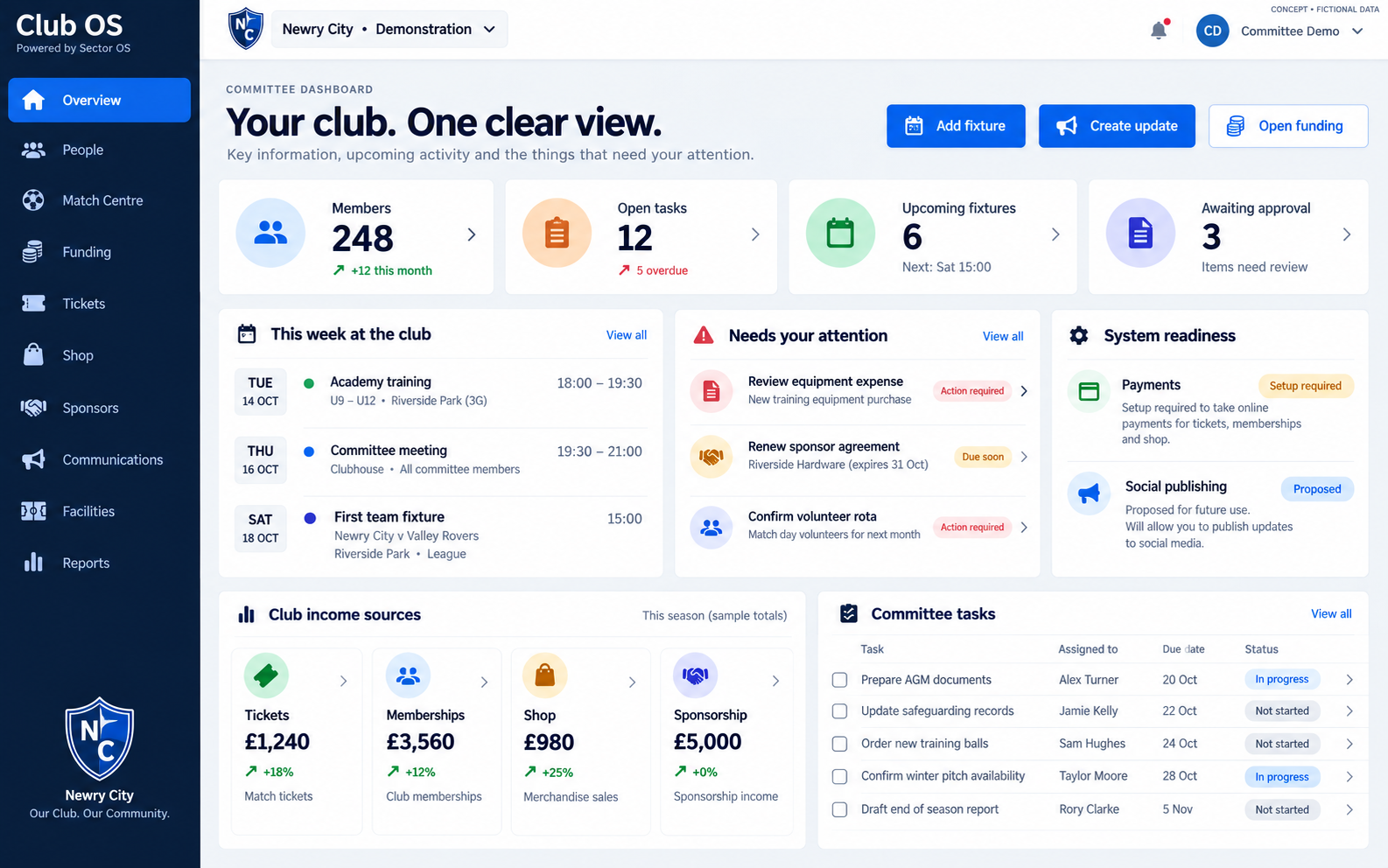
Your website’s Match Centre gives local businesses a visible place in club life. Package that presence into a match, a run of fixtures or a season—and give your commercial team a clear offer to take to market.
A named sponsor position beside the Match Centre, with approved business branding and a clear route to their offer or website as the placement is configured.
Offer one fixture, a fixture bundle or a season partnership. Agree placement, dates, price and deliverables in writing.
Scoreboard sponsorship, fixture previews and result graphics create a recognisable matchday identity for a local partner.
Keep the contact, agreement, renewal date, received amounts and promised benefits in the sponsor workspace.
Keep copies of delivered placements and posts. Use actual platform reports when available; never promise unmeasured reach.
Illustrative gross sponsorship revenue. Set a fee your club can justify and the number of fixtures you expect to sell.
Help supporters and local businesses understand what they can contribute to—and help the committee keep the records behind it.
Travel, training, equipment and matchday operations.
Named capital targets, updates and project accountability.
Sponsor a player, match, team or agreed club purpose.
Parking, tickets, merchandise and facilities each have their own operating journey.
Give back to your community and create a welcoming route into club life. Plan school visits, family activities and Group Support Days with a clear programme and responsible adults.
A traditional club deserves a different home from a bold modern matchday brand. Explore twelve different layouts, from Heritage to Floodlights, and try them in your club colours.
Find your club’s designProposed launch packages for Your Club OS. Website and hosting included. Begin with the essentials, then add the tools that fit your club.
ONE CLEAR ONGOING SERVICE
Your website package covers website hosting, your club hub and the back-office tools included in your plan, together with the maintenance, monitoring and support defined in your plan. The fee funds the ongoing service around your business, including the agreed review of tool performance and integration.
Shown separately: any one-off setup, design or migration fee, optional development and provider usage such as card processing, SMS or WhatsApp. Included allowances, monitoring frequency and response targets are confirmed before you subscribe. Widget-only plans cover the selected tool and its hub; hosting for an existing third-party website stays with its provider unless a website package is agreed.
A clear home for your website and everyday club administration.
Grow club income, relationships and supporter engagement.
For larger clubs, several sites or a supported move from existing systems.
Do it yourself: £0 setup. Use the templates and guides; your subscription still applies.
Assisted website setup: £179 once. Your supplied text, crest and photos; up to five pages, one review and launch. Data imports, extra modules and bespoke design are quoted separately.
Prices are in GBP and exclude VAT where applicable. Irish clubs receive an agreed euro quote before activation. Domain registration, mailboxes, payment processing, SMS, WhatsApp and external provider charges are separate.
These are proposed launch packages, not a promise that every integration is live. Card checkout, automated messaging, integrated ticket/shop operations and matchday social automation require further work and provider activation. Annual billing and these package allowances are not activated by this page.
Academy funding, Women’s Football and Community Outreach are separate optional sections. A club without those programmes does not need to carry their menus or workflows.
Begin with the club website, committee work and the practical records your volunteers need.
Add relevant parking, sponsorship, player, shop and ticket workflows as the club’s needs grow.
Enable separate programme funding only where the club operates those teams.
Agree the package, permissions, providers and tests before each club goes live.
Saved pilots and interactive demonstrations are available. The Newry example remains independent. Parking currently supports pay-at-ground reservations and an on-screen phone pass; card checkout and SMS are not connected. Matchday social automation is proposed. Richer club modules and the existing funding ledger are not yet one fully connected production service.
Choose an area, explore the sample records and see how it could help your club. Demo changes use fictional data.
Choose a design and club colours, add your club details, then agree which modules your volunteers need. Assign authorised staff, review the records and test each supporter journey before launch.
No. Academy funding and Women’s Football are separate optional areas. Community Outreach and Media can also be switched on when useful.
Create a match, enter the number of spaces and price, then open reservations. Supporters receive an on-screen mobile pass and staff can mark arrivals. The current pilot uses payment at the ground.
Yes. Choose one of twelve layouts, set your primary and secondary colours, and add the club crest, photographs, teams and information.
Open the interactive operations demo or view the independent Newry concept. A club rollout includes a review of permissions, providers and readiness.
Open the Your Club OS demo →FOR CLUB OWNERS & COMMITTEES
Bring the work behind the badge into a system the committee can understand, review and hand on.
See who is responsible, what has been agreed and which actions need attention. Keep strategic priorities visible between meetings.
Replace scattered task lists with assigned work and saved records. Give volunteers a clear next step without expecting everyone to run every part of the club.
Keep sponsorship agreements, recorded receipts and funding purposes clearer. Reconcile money against the appropriate accounts; a pledge or manually recorded receipt is not a verified bank balance.
Develop Match Centre, player and media partnerships. Track promised benefits and renewal dates, and budget whether sponsorship could help cover Club OS.
Give authorised people the supported access they need. Keep policy responsibilities, review dates and outstanding actions visible without opening private records to everyone.
Keep a useful history for the next committee. Use saved records, guides and available exports to support handover when volunteers or ownership change.
The current saved Club Office report covers tasks and news. A complete club-wide finance, income and operational dashboard still needs its remaining connections. Your own club leadership controls authorised club access; being the software provider does not create a routine right to inspect the club’s business.
Explore the private Club Office → · Try the club operations demo → · Read the committee guide →
OPTIONAL CLUB MEDIA & TV PARTNERSHIPS
An adaptable media opportunity for clubs with the people and permission to deliver it. Start with interviews or community stories; add highlights, podcasts and approved live links when appropriate.
Naming acknowledgement on agreed highlights and interviews; approved opening/closing artwork and supporter hub placement.
A local producer, photographer, college or agency provides agreed filming, editing, audio or training. Record cash and in-kind commitments separately.
A defined episode or series, with an agreed sponsor acknowledgement and reviewed short-form extracts.
Agree specific team-news, score, result or community graphics and channel acknowledgements. Match Centre rights stay separately scoped.
An optional audio agreement for clubs able to deliver commentary, with approved host acknowledgements and a listening-page placement.
Agree a placement in permission-based club updates. A sponsor does not receive the supporter mailing list. Sending and insertion require the relevant connections.
Define a ticket or booking-page acknowledgement where the ticketing provider supports it. Rendering and delivery must be verified before sale.
Keep Match Centre sponsorship separately scoped. Platform views, impressions and unique viewers are different measures; use dated evidence for each and do not add them together as a single audience.
Manage partner agreements → · Plan club content → · Read the media-partner guide →
Saved agreement and editorial-link pilot. Automatic filming, editing, analytics collection, sponsor billing and social publishing are not connected. Media is optional and can be disabled for clubs that do not need it.
HELP THE SYSTEM FUND ITSELF
A local sponsor can contribute to the software cost as part of an agreed media package. Start with the content your club can deliver, then work out the budget.
Software cost for a year: £780
£900 available after the entered delivery costs.
£120 remaining after the software fee.
Illustration only, using proposed software prices and your budget. This does not record a sponsorship, allocate receipts or start billing. Include relevant taxes, payment fees, production, travel and fulfilment costs in the final budget. Confirm current prices, terms and actual received funds before relying on coverage.
OPTIONAL · FOR CLUBS SERVING FOOD
A separate HACCP planning and records area for club kitchens, matchday food, clubhouse catering and hospitality. Leave it switched off if your club does not need it.
Document the process, hazards, controls, monitoring and verification around the club’s reviewed catering plan.
Keep temperature, cleaning, delivery, allergen-review and training records together, with observations and actions.
Record review responsibilities and dates; export a CSV or print the working records. A club review is not independent certification.
Try fictional catering records → · Open the saved owner pilot → · Read the setup guide →
Record-keeping pilot. The club must approve appropriate controls and local requirements. Automatic monitoring, sensors and a fully validated live HACCP system are not complete.
A CLEAR ROUTE INTO YOUR CLUB
Choose the tools your committee needs. Academy, women’s football, community programmes and catering can be added separately. We agree the scope and show the relevant workflow before switching anything on.
Walk through a fictional demo. Agree the tools, price, responsibilities and support your team needs.
Review existing records and permissions. Test imports, access and exports, then reconcile the result.
Run a sample matchday, sponsor agreement and committee handover. Train the people who will use each tool.
Approve the working scope, cutover and recovery plan. Use Ask Dougie, task guides and private support, with diagnostics and development agreed in your package.
Saved club operations pilots, sponsor and media planning, player records, outreach and optional owner-only catering records can be explored. Public demos use fictional records.
Connected matchday social publishing, live payment and receipt delivery, and complete production validation remain to finish. Stronger login, remaining privacy checks, full migration and account-wide exports are also launch work. Your agreed pilot scope determines what must be completed before use.
Explore the funding and sponsor pilot → · Arrange a scoped demonstration →
TRUST & DATA PROTECTION
Your members, players, sponsors and volunteers deserve clear privacy boundaries.
The shared business-workspace checks now require actual ownership. A platform admin title alone no longer opens another customer’s workspace. Club Office uses ownership or an active scoped membership.
Other module access paths still need the complete release audit.Passwords are hashed. Repeated failed logins trigger a lockout. Session cookies use Secure and HttpOnly protection, and password reset invalidates existing sessions.
Multi-factor authentication, passkeys and a customer session-management screen are not yet implemented.Required launch policy: the venue or club approves any support access to private operational records, with a defined purpose, limited duration and a visible access log.
The dedicated grant, expiry and audit workflow is still to build. Information you submit in a support ticket is intentionally shared with the support team.Use available module exports and agree a complete exit pack before account closure. Downloading records does not delete them or end your subscription.
Understand exports →Connections must identify what data a payment, messaging or hosting provider receives and why. A sale or booking does not automatically grant marketing permission.
Provider agreements, data locations and retention schedules need confirmation before live rollout.Preventing infrastructure administrators from reading stored data requires an additional encryption and key-custody design. That protection is not currently implemented.
We do not claim that nobody, including the software owner, can technically access all stored data today.These remain pilots. Full access testing, stronger authentication, customer-approved support access, retention and recovery checks, and independent security review must be completed before confidential live operations. Use fictional records in public demonstrations.
Read the Trust & Data Protection guide →MOVING FROM ANOTHER SYSTEM?
Start with a migration assessment. Agree the scope, cost and cutover before moving your records or changing the way your team works.
List the systems, contracts, website, domain, provider accounts and records you want to keep. Confirm export access and what can legally and technically be transferred.
Members, players, sponsors, fixtures, active reservations, funding records and website content. Treat junior records and guardian relationships as a separate permissioned migration. Agree the enabled modules, responsible people, timeline and any manual work.
Use an agreed secure transfer route. Match source fields, identifiers, dates, currencies and statuses. Deduplicate carefully; preserve consent source, purpose, time and withdrawals where available. Unknown consent stays unknown.
Import a small reviewed batch into an isolated test workspace once the required importer is built and approved. Check rejected rows, ownership, counts, totals and representative records with your team.
Practise daily tasks using guides and Ask Dougie. Reconcile future bookings, active orders, voucher or loyalty liabilities and any collected money. Avoid two systems accepting the same booking or payment.
Agree a change freeze, final export and delta reconciliation. Keep a recoverable backup and an agreed rollback window. Obtain customer sign-off before changing links, domains or intake.
Check the first live journeys, staff access and support issues. Keep the old system accessible for an agreed retention period, then close or remove access only with approval.
Keep your existing website or selected club tools where that is the right fit. Payment credentials, card details, subscriptions and provider tokens are not assumed transferable; the relevant provider must confirm the route.
Current stage: guided migration planning. A universal importer, automatic provider transfers and zero-downtime switching are not available. Each source system needs a verified mapping, test run and agreed price.
Use the exports available within each enabled tool, then request a scoped exit pack for the remaining records. Agree machine-readable CSV/JSON, document originals, identifiers, timestamps, consent evidence, financial balances and an exceptions list. Verify the files before closing the account.
Available now: the saved Club Office task/news working report has a CSV export; Hospitality Growth Office exports its saved planning data as JSON and campaign rows as CSV. These are partial module exports. A whole-account archive, bulk document bundle and full-suite extraction are still to build.
Read the export and exit guide →
Read the migration guide → · Start your migration brief → · Ask Dougie for help →
YOUR TEAM HAS BACKUP
A website in your colours. A clearer job for every volunteer. Help when you need it.
Choose from twelve designs, use your club colours and add only the operations your club needs. Academy and Women’s Football remain optional.
Explore club designs →Choose your system, describe the task and find checked answers with source guides and clear next steps. If you still need help, Sid prepares a ticket for you to review.
Ask Dougie →Search setup, daily tasks, team access, website updates and troubleshooting. Each guide explains the steps, what to check and which features are ready or still in development.
Open your user guide →Sign in to raise a private ticket, add a screenshot and follow replies in your support history. The team can connect relevant diagnostic evidence to the investigation.
My support tickets →Existing operator tools record diagnostic runs, test evidence and launch blockers. This helps the team investigate problems and review readiness before a tool is released.
Continuous monitoring and independent alerts are not configured. Response hours and service targets must be agreed.Build requests, revisions and review history support improvements to websites and apps. Scope, testing, release readiness and any additional costs are reviewed before rollout.
My system build →Ask Dougie · Searchable guides · Getting started · Private tickets and replies · Screenshot support · Build reviews · Diagnostic evidence · Training resources
Written help is available now. Training currently provides lesson storyboards and companion guides; recorded lessons, live AI conversation and support email notifications are still to be connected.